
TL;DR
- Create a Japanese Nintendo account using a different email address and set region to Japan
- Link the Japanese account to a new user profile on your Switch console
- Navigate the Japanese eShop to download Switch Online game collections
- Launch games using your main account while maintaining Japanese access
- Access exclusive titles like Mother 3 and Fire Emblem games not available elsewhere
Discover how to expand your gaming library by accessing Japan-exclusive titles through Nintendo Switch Online. This comprehensive guide reveals the regional content variations that make certain classic games available only to Japanese subscribers.
Nintendo Switch Online offers tiered subscriptions with distinct benefits. The standard $20 annual plan provides NES, SNES, and Game Boy classics, while the $50 Expansion Pack upgrade adds N64 and Game Boy Advance titles. Crucially, Nintendo maintains different game libraries across regions, with sought-after RPGs like Mother 3 for Game Boy Advance remaining exclusive to Japanese collections. Fortunately, the Switch’s region-free design enables you to download and enjoy these titles without purchasing additional subscriptions.
Pro Tip: Before creating your Japanese account, ensure your main subscription is active on your primary profile. The Japanese collections require verification through an active Nintendo Switch Online membership, even when accessed through regional workarounds.
Begin by establishing a Japanese Nintendo Account through the official accounts.nintendo.com website. You’ll need an email address different from your primary account credentials. During the registration process, pay close attention to the region selection step—this must be set to Japan to access the exclusive content library.
After completing online registration, proceed to your Switch console’s system settings. Navigate to Users section and create a fresh profile with a distinct nickname and avatar. When prompted to associate a Nintendo Account, authenticate using your newly created Japanese credentials. This linkage is essential for regional eShop access.
Common Mistake to Avoid: Many users mistakenly try to change their existing account’s region instead of creating a new Japanese-specific account. Region switching on existing accounts can cause wallet balance issues and purchase complications, making the separate account approach significantly safer.
Time Estimate: Allow approximately 10-15 minutes for the complete account creation and linking process, including email verification steps.
Launch the eShop application using your Japanese-linked profile. You’ll encounter the Japanese storefront interface, which predominantly displays in Japanese. Don’t be intimidated—the navigation follows consistent patterns regardless of language.
On the left-side navigation panel, locate the second-to-last option labeled “Nintendo Switch Online” in English text. Select this menu to view all available classic console collections. Download the specific libraries containing your desired games—Mother 3 resides in the Game Boy Advance collection. The download procedure remains identical across different console collections.
Optimization Tip: Use visual cues rather than relying on text recognition. The Nintendo Switch Online section maintains consistent positioning and iconography across regional eShop variants, making navigation more accessible despite language barriers.
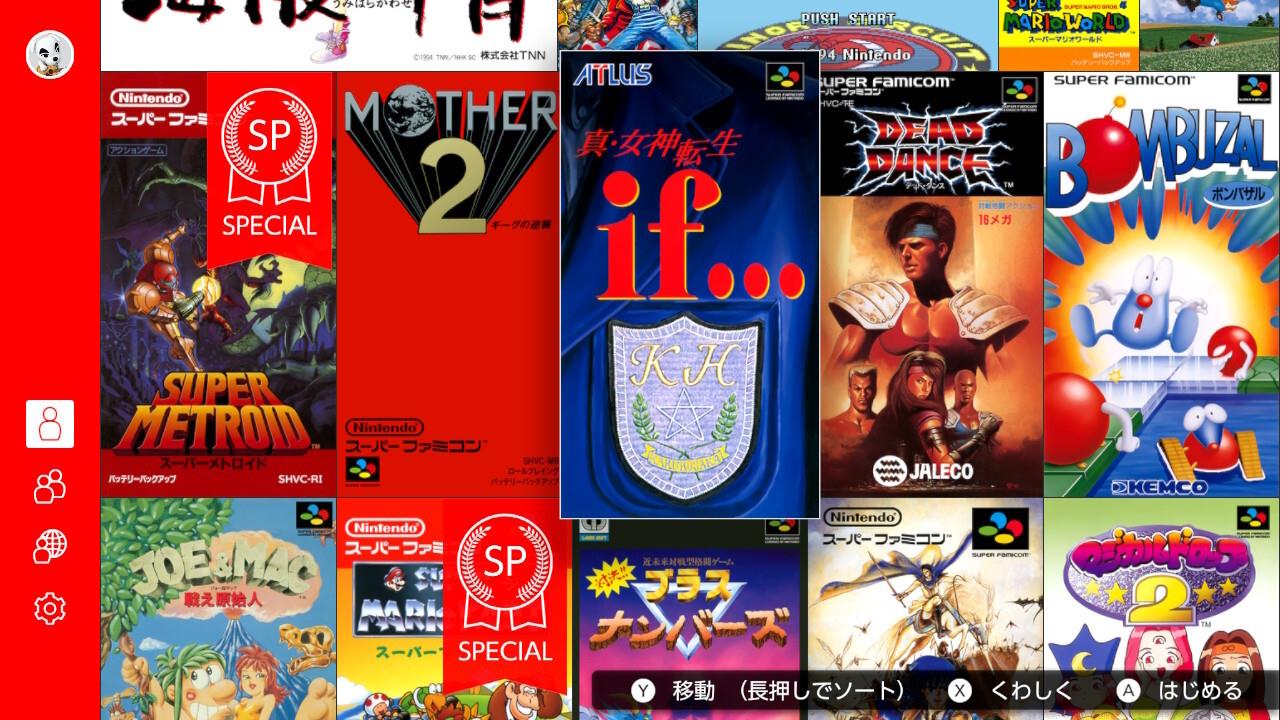
The Japanese eShop offers exclusive titles like Shin Megami Tensei If, unavailable in Western regions.
Once downloads complete, return to your Switch home screen. Open the Japanese Nintendo Switch Online applications, but crucially select your primary account when launching. Your main profile must possess an active Nintendo Switch Online subscription to initialize the applications.
You now maintain full access to Japan-exclusive Nintendo Switch Online titles like Mother 3. While game interfaces and text remain in Japanese, this method provides the only legitimate pathway to experience these titles on Switch hardware. Consider pairing this access with translation guides or walkthroughs for story-heavy RPGs.
Advanced Strategy: For frequent access, add the Japanese Switch Online apps to your console’s quick menu for faster launching across gaming sessions.
Related Resource: For comprehensive gaming strategies, check out our Complete Guide to master complex game systems.
The Japanese Nintendo Switch Online service features numerous titles that never received Western releases. These exclusives span multiple classic console generations and include notable RPGs, strategy games, and unique Nintendo titles.
- NES Open Tournament Golf SP
- Fire Emblem: Shadow Dragon and the Blade of Light
- Clu Clu Land: Welcome to New Cluclu Land
- Fire Emblem: Mystery of the Emblem
Notable Highlight: The Fire Emblem series entries represent foundational tactical RPGs that established the franchise’s core mechanics, offering historical insight into the series evolution.
Game Mechanics Insight: Many Japan-exclusive titles feature unique gameplay systems that influenced later international releases. Studying these games provides valuable context for understanding gaming history and design evolution.
Further Reading: Enhance your gaming expertise with our Weapons Unlock guide for advanced progression strategies.
Action Checklist
- Create Japanese Nintendo Account with unique email
- Link Japanese account to new Switch user profile
- Navigate Japanese eShop to download desired collections
- Launch games using main account for subscription verification
No reproduction without permission:SeeYouSoon Game Club » How To Play Mother 3 And Other Japan-Only Games With Nintendo Switch Online Unlock Japan-exclusive Nintendo Switch Online games with this step-by-step guide to creating a Japanese account