
TL;DR
- Optimized Tweaks S.2 mod provides 5+ FPS boost and addresses VRAM crashes
- Nexusmods requires account login with multiple version options for different system configurations
- Install mods in ~mods folder within game directory, create if missing
- Combine mod usage with in-game settings optimization for maximum performance gains
- Monitor performance metrics to identify specific bottlenecks and apply targeted solutions
Games and Esports Articles
STALKER 2: Heart of Chornobyl launched with significant performance demands that particularly affected gamers using older or budget hardware configurations. The game’s stunning visual fidelity and complex environmental rendering create substantial strain on both CPU and GPU resources, leading to frame rate drops and occasional stability issues. Fortunately, the dedicated modding community rapidly developed optimization solutions to enhance gameplay smoothness and address technical problems.
Among the most effective community-developed solutions, Optimized Tweaks S.2 stands out as the premier performance enhancement modification currently available. This comprehensive optimization package addresses multiple performance aspects simultaneously, making it particularly valuable for players experiencing inconsistent frame rates. You can access the mod directly through this official Nexusmods portal.
The modification developers have engineered their solution to deliver measurable performance improvements across several key areas. Beyond the advertised 5+ FPS increase in demanding zones, the mod optimizes memory allocation patterns and reduces unnecessary rendering overhead. Early adopters report not just higher average frame rates but also significantly improved stability during intensive combat sequences and environmental transitions.
For players encountering specific technical hurdles, multiple specialized variants exist within the Optimized Tweaks ecosystem. These include dedicated versions targeting VRAM management issues that have caused crashes for users with limited graphics memory. Similar to understanding weapon mechanics in BF6, knowing which mod version matches your system specifications is crucial for optimal results.
Before downloading any modification files, ensure you have an active Nexusmods account, as registration is mandatory for file access. When selecting your preferred mod version, carefully evaluate your system’s specific limitations and the performance issues you’re experiencing. The standard version works well for general optimization, while VRAM-focused variants specifically help systems struggling with texture-related crashes.
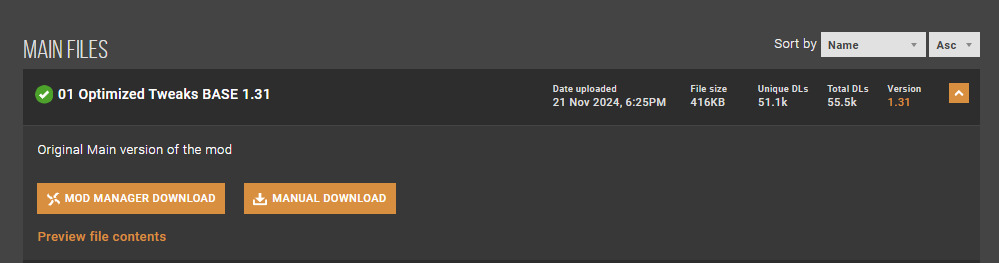
Once downloaded, navigate to your primary STALKER 2 installation directory and locate the specific path: S.T.A.L.K.E.R. 2 Heart of ChornobylStalker2ContentPaks~mods. If this directory doesn’t exist, create it manually to ensure proper mod functionality. This installation approach shares similarities with class customization in BF6, where proper configuration directly impacts gameplay effectiveness.
Proper mod installation requires precise file placement to avoid conflicts with game updates or other modifications. Always back up your save files before installing new mods, and consider testing each modification individually to identify potential compatibility issues. The process typically takes 5-10 minutes from download to activation.
Beyond mod installations, several in-game settings adjustments can further enhance your STALKER 2 experience. Reducing shadow quality, disabling motion blur, and lowering anti-aliasing settings typically yield the most significant performance gains without drastically compromising visual quality. These adjustments work synergistically with performance mods to create a comprehensive optimization strategy.
For maximum performance improvement, combine mod usage with system-level optimizations like updating graphics drivers and adjusting Windows power settings. Monitoring tools like MSI Afterburner can help identify specific performance bottlenecks, allowing for more targeted optimization approaches. Understanding these optimization principles can also benefit your gameplay in other titles, much like applying strategies from our Battlefield 6 complete guide to master different gaming environments.
Common installation mistakes include placing files in incorrect directories, using incompatible mod versions, or neglecting to create the necessary ~mods folder structure. Always verify file paths and mod compatibility with your current game version to prevent technical issues and ensure optimal performance enhancement.
Action Checklist
- Create Nexusmods account and download Optimized Tweaks S.2 mod
- Back up save files and identify correct mod version for your system
- Navigate to game directory and create ~mods folder if missing
- Place downloaded mod files in correct directory path
- Adjust in-game graphics settings and monitor performance improvements
No reproduction without permission:SeeYouSoon Game Club » How to increase FPS and optimize STALKER 2 on low-end PCs. Mods to boost performance and fix crashes in S.T.A.L.K.E.R. 2 Essential performance optimization guide for STALKER 2 with mod installation and troubleshooting tips