
TL;DR
- Discord’s ignore feature provides discreet message filtering without removing friends
- Ignored users remain on your friends list but their messages are hidden from view
- The process is completely reversible and takes only seconds to activate or deactivate
- Unlike blocking, ignoring maintains social connections while reducing communication noise
- Advanced users can combine ignore with other Discord features for optimal server management
Discord’s ignore functionality represents a sophisticated approach to communication management that prioritizes user control without severing social connections. This feature serves as an intermediate solution between complete muting and permanent blocking, offering nuanced control over your digital interactions.
Discord recently introduced an ignore option that enables users to discreetly filter messages from specific individuals without notifying them. This subtle approach to communication management differs significantly from traditional blocking mechanisms, providing a more socially graceful way to manage your interaction landscape.
While Discord already offered features like mute and block capabilities for controlling message flow and server notifications, the ignore function operates on a different principle. It maintains the appearance of normalcy while giving you complete control over whose messages actually reach your attention. This makes it particularly valuable in gaming communities where maintaining social harmony is crucial for team dynamics.
The ignore mechanism essentially functions as a soft-blocking tool. Unlike traditional blocking that removes users from your friends list entirely, ignoring preserves the friendship connection while filtering out their communications. When you activate ignore on another user, they receive no notification and can still view your profile status and activity indicators. However, all messages and notifications from that person become automatically hidden across servers, direct messages, and group conversations.
Rather than displaying messages from ignored individuals, Discord implements a visual indicator system. The platform grays out the user’s profile and provides a numerical count of hidden messages. If you need to review these filtered communications later, you can access them by clicking on the notification about unread messages concealed by the ignore feature. This approach gives you the final say in what content you consume while maintaining the social fabric of your gaming communities, which is particularly important when coordinating strategies in games like Battlefield 6 where team communication is essential.
Implementing Discord’s ignore feature requires just a few simple steps, but understanding the nuances can help you maximize its effectiveness for your specific communication needs. The process is designed for quick activation while providing adequate confirmation to prevent accidental usage.
To initiate the ignore function on any Discord user, simply right-click their username or profile picture within any server or direct message interface. From the context menu that appears, select the “Ignore” option. Discord will then display a confirmation window detailing exactly what the feature does and its implications. After reviewing this information, click “Ignore” again to finalize the action. This two-step process ensures you don’t accidentally filter someone’s messages without intending to do so.
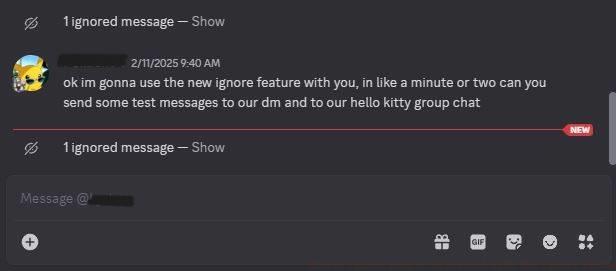
Image: Discord via Polygon
Reversing the ignore function follows the identical procedure. Right-click the same user and select “Unignore” from the menu. The system doesn’t require additional confirmation for reversal, making it easy to restore communication when circumstances change. Both activation and deactivation processes typically complete within seconds, providing immediate control over your communication environment.
Advanced users should consider combining the ignore feature with other Discord tools for optimal community management. For instance, you might use server-specific mutes for general noise reduction while reserving ignore for persistent individual issues. This layered approach to communication management is similar to how experienced players approach class selection in BF6 – using the right tool for each specific situation rather than applying one solution universally.
Common implementation mistakes include confusing ignore with block functions or expecting it to work across all platform interfaces simultaneously. Remember that ignore primarily affects message visibility rather than connection status. For comprehensive communication strategies in gaming environments, consider how ignore complements other features when you’re working through weapon unlock assignments in intense gaming sessions where focused communication is crucial.
Action Checklist
- Identify target user for message filtering in your Discord server or DMs
- Right-click username and select Ignore, then confirm in pop-up window
- Verify ignore activation by checking for grayed-out profile and message count
- Configure complementary mute settings for server-wide noise reduction
- Periodically review ignored users list and adjust as social dynamics evolve
No reproduction without permission:SeeYouSoon Game Club » How to ignore people on Discord with the ignore button Master Discord's ignore feature to manage conversations discreetly while maintaining social connections