
TL;DR
- Starfield offers two primary fast travel types: local planetary navigation and interstellar grav jumps
- Fast travel becomes available early in the campaign during the Kreet mission, expanding at New Atlantis
- Navigation requires accessing the star map interface while avoiding combat, encumbrance, and interior locations
- Grav jumps between systems depend on ship fuel capacity, grav drive specifications, and discovered pathways
- Advanced strategies include power allocation optimization and multi-jump route planning for efficiency
Navigate seamlessly across Starfield’s vast universe using sophisticated fast travel mechanics that transform planetary and interstellar exploration. Understanding these systems is crucial for efficient movement between the game’s numerous star systems and planetary bodies.
Mastering Starfield‘s fast travel options significantly enhances your galactic journey. With over 1,000 planets spread across multiple star systems, efficient navigation becomes essential for comprehensive exploration. The game provides several distinct fast travel methodologies, each with specific considerations and requirements that impact your travel efficiency.
Starfield organizes its fast travel mechanics into two primary categories: local planetary navigation and interstellar grav jump systems. These travel methods unlock progressively throughout your adventure, beginning with the initial Kreet mission early in the main storyline. Your navigation capabilities expand substantially upon reaching New Atlantis, the capital city located on Jemison within the Alpha Centauri system.
Activate planetary fast travel by accessing the menu system and selecting the map interface positioned in the upper-left corner. The initial map display reveals key points of interest across planets and moons. Target any visible landmark, established landing zone, or your spacecraft to instantly transport to that destination. Important restrictions apply: fast travel remains disabled during combat encounters, when carrying excessive weight beyond your capacity, or while situated inside enclosed environments like cave systems or facility interiors.
As demonstrated in the visual reference below, New Atlantis features six designated fast travel locations: the spacecraft docking bay, commercial sector, residential zone, MAST administrative district, the Lodge headquarters, and your personal ship. Zooming out from this selection reveals additional planetary outposts. Furthermore, you can select any terrestrial region for immediate landing, provided the target area isn’t oceanic terrain.
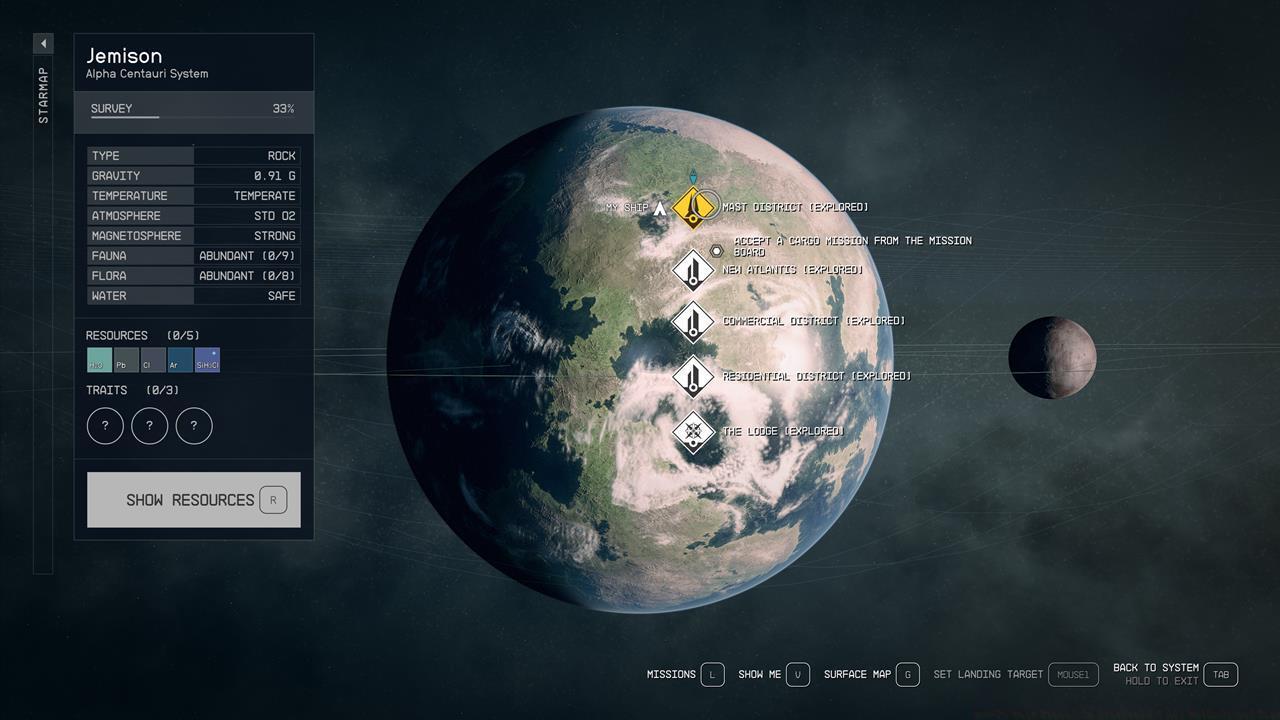
New Atlantis and Jemison offer multiple strategic fast travel locations for efficient planetary navigation.
Strategic placement of outposts near key fast travel points can significantly reduce traversal time between resource gathering locations and mission objectives.
The alternative Starfield navigation method involves traveling between different star systems. Following the standard procedure, access your map interface and navigate outward until the galactic view (commonly called the star map) becomes visible. This interface enables selection of destination star systems. Critical limitation: direct travel to a star system requires prior discovery of connected navigation pathways or jump nodes.
Travel distance between systems directly correlates with your vessel’s fuel reserves and grav drive capabilities. Additionally, certain routes may necessitate multiple consecutive jumps rather than single direct transitions. For comprehensive spacecraft enhancement guidance, consult our detailed ship upgrades and modifications guide.


Left: Galactic navigation display illustrating connected pathways for grav jump planning; Right: Power distribution interface showing grav drive activation requirements for interstellar travel.
Journeying to another star system consistently requires executing a grav jump maneuver. Consider these enhanced fast travel strategies:
Optimize your grav jump efficiency by strategically allocating power to your ship’s grav drive before initiating interstellar travel. Advanced players recommend maintaining at least 50% fuel capacity for unexpected detours or emergency jumps. Common mistakes include attempting direct jumps to undiscovered systems or ignoring fuel requirements for return trips.
Plan multi-jump routes by identifying systems with refueling stations along your path. Experienced explorers suggest scanning systems thoroughly before moving onward to ensure all potential jump routes become available. Navigation between established settlements typically requires 2-5 minutes depending on route complexity, while unexplored regions may demand 10-15 minutes for comprehensive mapping.
For players seeking to master Starfield’s complete gameplay systems, our Complete Guide provides comprehensive coverage of all mechanics. Weapon enthusiasts should consult the Weapons Unlock guide for combat optimization, while strategic players will benefit from the Class Guide for role specialization.
Always verify landing zone safety before committing to planetary fast travel, as some locations may contain hostile environmental conditions or enemy patrols. Keep essential resources stocked for extended exploration sessions beyond established fast travel networks.
Action Checklist
- Access star map interface from menu system
- Scan and discover new star systems to unlock direct travel routes
- Allocate power to grav drive before initiating interstellar jumps
- Plan multi-jump routes considering fuel capacity and refueling stations
- Verify landing zone safety and environmental conditions before planetary travel
No reproduction without permission:SeeYouSoon Game Club » How To Fast Travel In Starfield – All Methods And Tips Master Starfield's fast travel system with expert navigation tips and optimization strategies for efficient galaxy exploration