
TL;DR
- Press R (keyboard) or Down (gamepad) to activate torch instantly
- Manage torch assignments across all three outfit presets for reliable access
- Acquire torches from traders, enemies, or through stealth acquisition
- Verify inventory slot highlighting and equipment loadout compatibility
- Utilize torch for navigation, combat preparation, and environmental interaction
Games and Esports Articles
Navigating the treacherous darkness of medieval Bohemia presents significant challenges in Kingdom Come Deliverance 2. Unlike modern games with multiple lighting options, KCD2 maintains historical accuracy by limiting illumination sources. The torch becomes your primary tool for safe passage through dense forests, rocky terrain, and unlit interiors where visibility drops dramatically. Understanding torch mechanics early prevents frustrating encounters with environmental hazards and hostile forces.
Torches serve multiple critical functions beyond basic illumination. They provide psychological comfort during nighttime exploration, help identify interactive objects in dark areas, and can even influence NPC behavior during stealth sequences. Proper torch management separates novice players from seasoned adventurers in this historically grounded RPG experience.
Which key is used for torches in KCD2
The primary torch activation command defaults to the R key on PC keyboards or Down directional button on gamepad controllers. This quick-access function should immediately illuminate your surroundings when pressed. If the torch fails to deploy, navigate to your character inventory and locate the Additional Weapons category in the equipment menu.
Within the inventory interface, double-click any available torch to transfer it to your active equipment slots. The system provides visual confirmation through yellow highlighting around the appropriate equipment position adjacent to Henry’s character model. This color-coded system ensures you can verify successful torch assignment before closing the inventory screen.
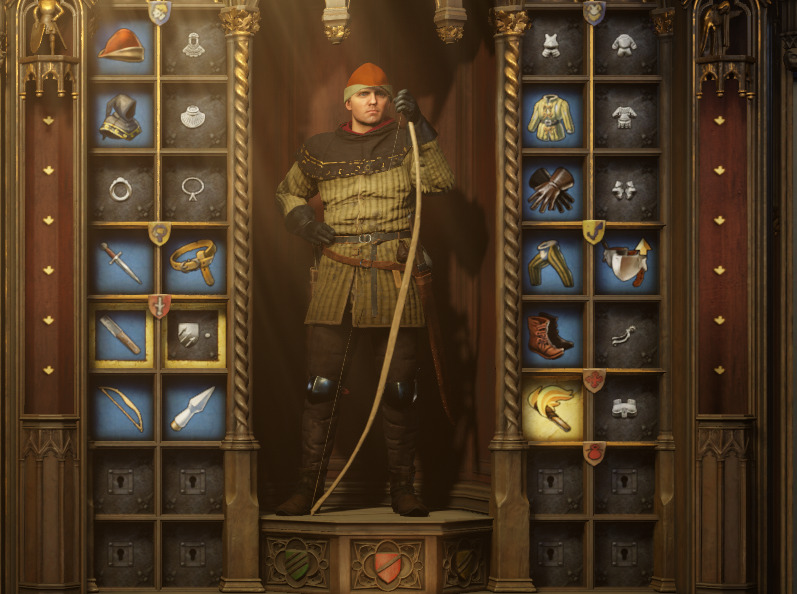
Advanced players should note that torch assignment persists across gaming sessions once properly configured. However, certain story events or combat sequences may temporarily disable torch functionality for narrative purposes. Always recheck your equipment after major plot developments.
Cannot equip or use torch in KCD2
When torch activation fails despite correct button inputs, investigate your outfit configurations first. Kingdom Come Deliverance 2 introduces three preset equipment loadouts marked by distinctive shield icons beneath your character portrait. Switch between these configurations using the O key or direct interface selection.
Ensure every outfit variation includes torch assignment in its equipment scheme. The most common oversight involves creating stealth or combat-focused loadouts while neglecting to include illumination tools. This oversight becomes particularly problematic during unexpected nighttime encounters or cave explorations.
Torch acquisition follows multiple pathways suitable for different playstyles. Local traders typically stock torches at affordable prices, while defeated enemies often drop functional torches as loot. For players embracing criminal approaches, torches can be acquired through theft from various settlements and campsites throughout Bohemia.
Strategic torch employment extends beyond basic navigation. Experienced players utilize torches to scout enemy positions in dark areas, identify valuable items in unlit interiors, and even create temporary distractions during stealth sequences. The flickering light can mask subtle movements when approaching guarded locations.
How to save different outfits in KCD2. How to quickly switch between armor and stealthy clothes in Kingdom Come: Deliverance 2
There’s a lot of gameplay and roleplay related to your clothing in the medieval society of Kingdom Come: Deliverance 2. The sequel brought many new features, including the long-awaited ability to change…
Action Checklist
- Test default torch activation (R key/D-pad Down)
- Configure torch in all three outfit presets
- Acquire backup torches from traders or enemies
- Practice quick outfit switching for different scenarios
No reproduction without permission:SeeYouSoon Game Club » How to equip and use torches in Kingdom Come Deliverance 2. What key activates torch in KCD2 Master torch mechanics in Kingdom Come Deliverance 2 with essential controls, troubleshooting, and advanced lighting strategies