
TL;DR
- Access name changes through Settings > Help menu, not character customization
- Names must be at least 2 characters but have hidden character limits
- Changing names affects multiplayer interactions and friend recognition
- Save your game before attempting name changes to prevent data issues
- Consider name permanence as changes are limited in frequency
Many Disney Dreamlight Valley players discover they want to update their character’s identity after hours of gameplay. The initial name selection might not reflect your evolving connection to the game world, especially as you develop deeper relationships with characters like Mickey and Goofy.
Disney Dreamlight Valley continues expanding with regular content updates that transform player experiences. The introduction of multiplayer features particularly emphasizes the importance of your displayed identity. While avatar customization offers extensive visual options through clothing and accessories, your chosen name serves as your primary identifier across all social interactions within the valley.
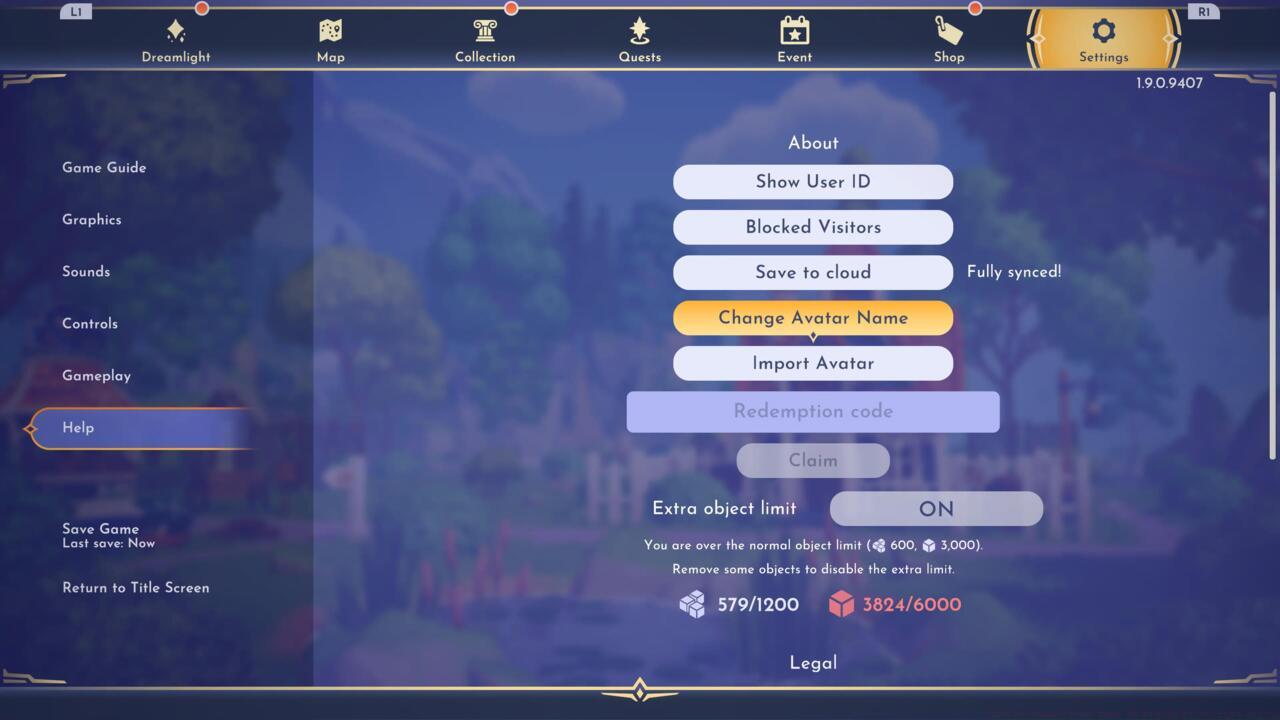
Change Avatar Name
Modifying your character’s identity in Disney Dreamlight Valley follows a counterintuitive path that many players overlook. Rather than searching through character customization menus where you adjust appearance, the name change functionality resides within system settings.
Begin by opening the Settings menu from the pause screen. Scroll downward past audio and visual options until you locate the Help section. This area manages fundamental game operations including cloud saving functionality and code redemption systems.
Within the Help interface, continue scrolling to discover the Change Avatar Name button. Activation presents a text field where you can input any designation containing two or more characters. The system automatically saves modifications upon confirmation.
While the naming system appears straightforward, several hidden restrictions impact your choices. Although the interface specifies a two-character minimum, it enforces an unstated maximum around twenty characters. Special character usage varies by platform, with console versions typically permitting symbols unavailable on other systems.
A frequent error involves players attempting name changes during multiplayer sessions, which temporarily disables the option. Always perform identity modifications in single-player mode to ensure system availability. Additionally, consider that frequent name alterations might confuse friends who recognize you by your previous designation.
For comprehensive gaming strategies beyond character customization, explore our Complete Guide to master complex game mechanics. Weapon enthusiasts should consult our detailed Weapons Unlock resource, while class specialization advice appears in our Class Guide for optimal character builds.
Action Checklist
- Access Settings from pause menu and navigate to Help section
- Locate Change Avatar Name option below cloud save settings
- Input new name (2-20 characters) and confirm selection
- Verify change appears correctly in multiplayer sessions
No reproduction without permission:SeeYouSoon Game Club » How To Change Your Name In Disney Dreamlight Valley Master Disney Dreamlight Valley name changes with expert tips, common pitfalls, and optimization strategies