
TL;DR
- CS2 demands significantly more GPU power than CS:GO, shifting performance bottlenecks
- High-end RTX 40-series cards deliver 300+ FPS at 1440p for competitive play
- Mid-range GPUs like RTX 3060 and RX 6700 XT offer excellent 1080p performance
- Professional players should target 144Hz+ monitors for optimal competitive advantage
- Regular driver updates and in-game settings optimization can boost FPS by 15-25%
Games and Esports Articles CS 2
Counter-Strike 2 launched on September 27 with an explosive debut, attracting over 1.4 million players within its first 24 hours. The Source 2 engine introduces substantial visual enhancements that significantly increase hardware requirements compared to CS:GO. Techpowerup conducted comprehensive testing using 40 different GPUs to provide detailed FPS benchmarks across various graphics processors.
These performance evaluations were released on September 29, shortly after CS2’s debut. As Valve continues releasing optimization patches and addressing technical issues, these performance metrics may evolve over subsequent updates.
Valve changes weekly skin/case drops in CS2. How to get Care Package rewards in CS2
We have a choice now.
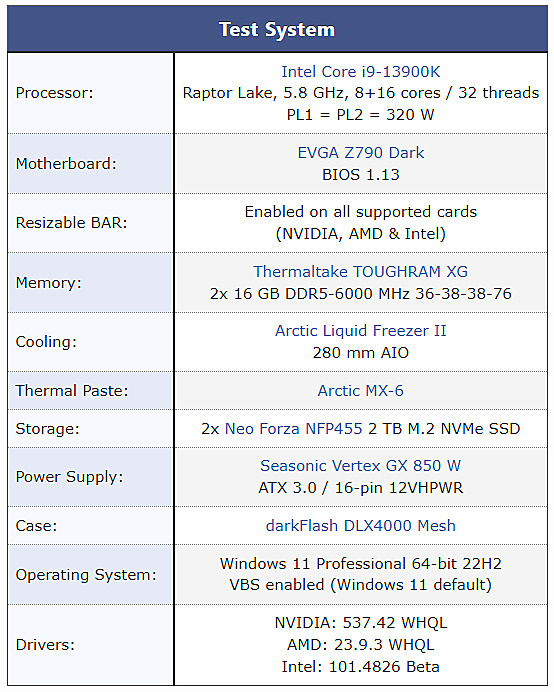
During the beta testing phase, technical analysts identified a crucial performance shift: CS2 places substantially greater load on GPU resources compared to CPU processing, which represents a fundamental departure from CS:GO’s optimization patterns. This architectural change makes comprehensive GPU testing essential for understanding performance capabilities, though system components like RAM speed and processor performance still contribute meaningfully to overall gaming experience. Below you’ll find detailed specifications of the test system configuration.
All benchmark results were captured using maximum in-game graphical settings, though the refresh rate was configured at 59Hz. Competitive esports athletes typically utilize 144Hz, 240Hz, or even 360Hz displays for superior motion clarity and reduced input latency.
CS2 official minimal system requirements on Steam. Can my PC run CS2?
System requirements for Windows, Linux
CS2 average FPS on 40 GPUs at 2560×1440
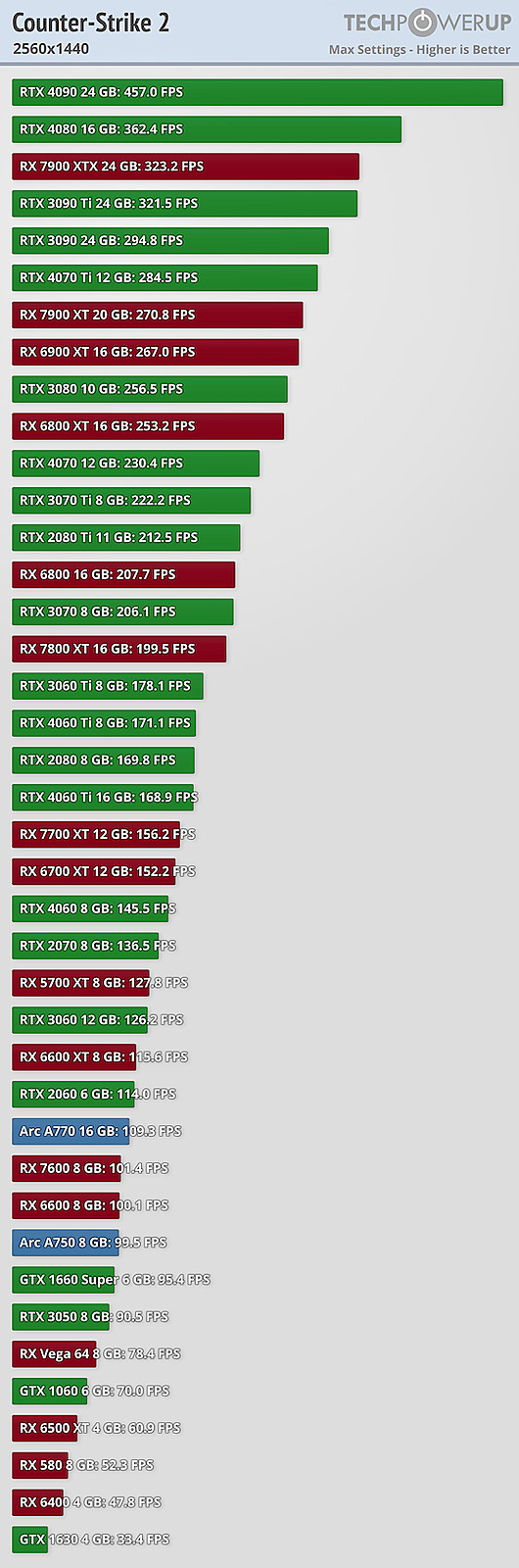
1440p resolution testing reveals significant performance stratification across GPU tiers. High-end models like the RTX 4090 achieve remarkable frame rates exceeding 400 FPS, providing ample overhead for high-refresh-rate gaming. The RTX 4080 and RX 7900 XTX follow closely, both delivering smooth 300+ FPS performance that ensures competitive responsiveness.
Mid-range performers including the RTX 4070 and RX 7800 XT maintain 200-280 FPS ranges, offering excellent value for gamers seeking high-resolution performance without flagship pricing. Budget-conscious options demonstrate the importance of resolution scaling, with entry-level cards struggling to maintain consistent 144Hz performance at native 1440p settings.
Performance Optimization Tip: For GPUs falling below 144 FPS at 1440p, consider adjusting shadow quality and anti-aliasing settings, which can yield 20-30% performance improvements with minimal visual compromise.
CS2 average FPS on 40 GPUs at 1920×1080
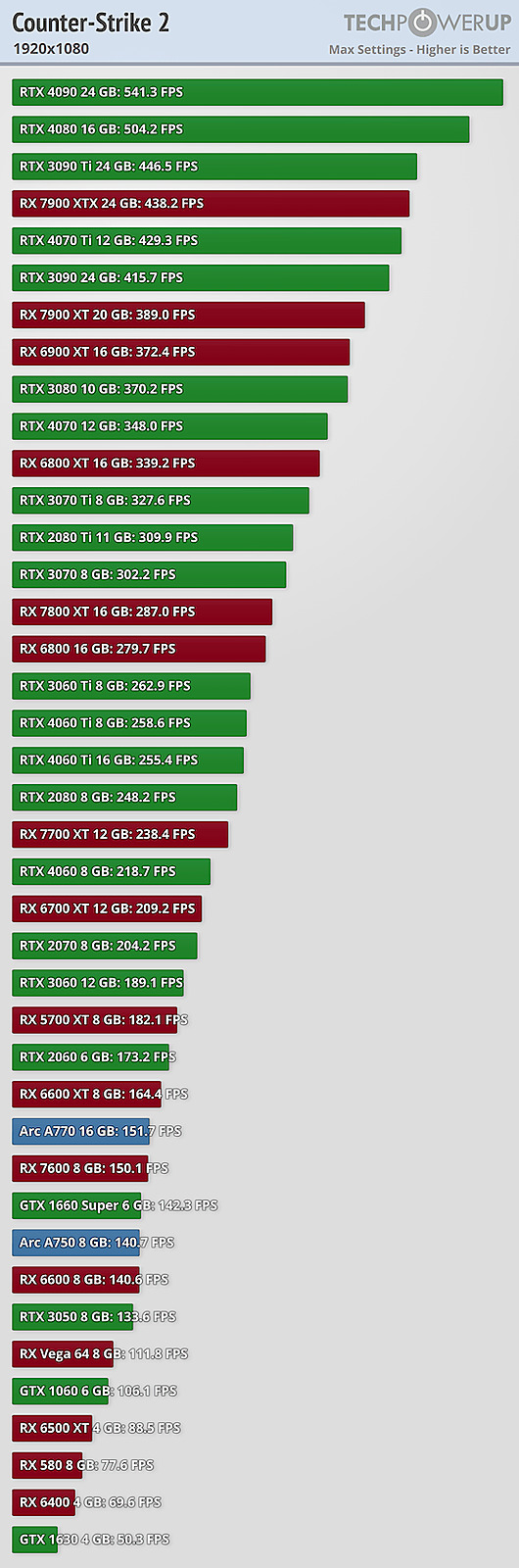
1080p testing demonstrates that most modern GPUs deliver exceptional performance suitable for competitive gaming. Current-generation mid-range cards like the RTX 4060 and RX 7600 consistently achieve 200-350 FPS, providing smooth gameplay even during intensive firefights and smoke-filled engagements.
Entry-level options including the RTX 3050 and RX 6600 maintain solid 144+ FPS performance, making them excellent choices for budget-conscious competitive players. Even older generation cards like the GTX 1660 Super still deliver playable 100+ FPS performance at this resolution.
Common Performance Mistake: Many players overlook driver optimization and background application management, which can consume 10-15% of available GPU resources. Regular driver updates and closing unnecessary applications can significantly boost in-game performance.
For players targeting professional-level performance, understanding your hardware capabilities is crucial for maintaining competitive edge in high-stakes matches.
Test System
Beyond raw GPU selection, several optimization techniques can dramatically improve your CS2 experience. Start by ensuring your graphics drivers are current – both NVIDIA and AMD regularly release game-specific optimizations that can boost performance by 10-20%. Next, optimize in-game settings by reducing shadow quality and post-processing effects, which typically have minimal impact on competitive visibility while significantly increasing frame rates.
System-level optimizations include disabling unnecessary background applications, ensuring adequate cooling for consistent performance, and configuring Windows for optimal gaming performance. Monitor your system performance during gameplay to identify potential bottlenecks.
Pro Tip: For maximum competitive advantage, pair your optimized GPU settings with proper game configuration to create a seamless competitive gaming environment. Regular maintenance including driver updates and system cleaning can maintain optimal performance over time.
Remember that consistent high FPS is more valuable than occasional peak performance. Stability ensures predictable aiming and movement responsiveness during critical gameplay moments.
Action Checklist
- Update graphics drivers to latest stable version
- Benchmark your current FPS using in-game performance metrics
- Optimize in-game settings: reduce shadows, disable motion blur
- Close background applications before gaming sessions
- Monitor system temperatures during extended gameplay sessions
No reproduction without permission:SeeYouSoon Game Club » How many FPS can your PC get in CS2? FPS tests in Counter-Strike 2 for different video cards (40 GPUs, Full HD, 1920×1080, 2560×1440, RTX, RX series) Comprehensive CS2 GPU performance analysis with 40 graphics cards tested across multiple resolutions