
Comprehensive guide to Halo Infinite’s data corruption bug and prevention strategies for campaign and multiplayer modes
Understanding the Save-Wiping Login Bug
A critical technical issue in Halo Infinite has emerged that permanently erases players’ campaign progression data while simultaneously blocking access to multiplayer functionality. This represents one of the most severe game-breaking bugs encountered in recent gaming releases.
The Halo Infinite community has uncovered a devastating software flaw capable of completely eliminating hours of campaign progress through irreversible save file corruption.
While Halo Infinite received widespread acclaim for revitalizing the franchise’s signature combat mechanics and introducing innovative open-world exploration, the title continues to struggle with persistent technical issues. Among these problems, the double-authentication glitch stands out as particularly destructive. This vulnerability doesn’t just temporarily inconvenience players—it systematically destroys their invested time and progress across both single-player and multiplayer modes, creating a significant barrier to continued engagement with the game’s content.
 Dustin K
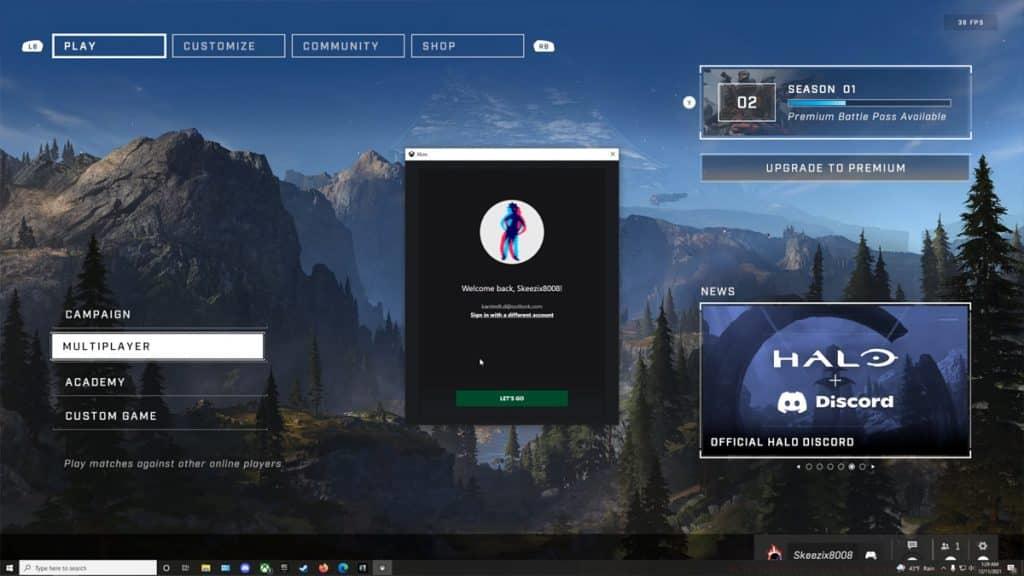
This authentication prompt signals immediate danger to your saved data—handle with extreme caution Content creator Dustin K provided crucial documentation of this vulnerability through detailed YouTube analysis. His investigation, combined with numerous player testimonials across social media platforms, confirms this isn’t an isolated incident but rather a systemic problem affecting the broader Halo Infinite community with consistent destructive outcomes.
How the Bug Gets Triggered
Technical analysis reveals the glitch activates when Halo Infinite’s input detection system erroneously registers multiple controller sessions simultaneously. This conflict typically occurs during controller connectivity interruptions or when players utilize both keyboard/mouse and controller inputs interchangeably. The game’s authentication framework becomes confused by these multiple input claims, triggering a faulty security response.
When players encounter this input conflict, the interface displays a deceptive Xbox account authentication prompt featuring a prominently displayed green “Let’s Go” action button. This button represents the critical point of failure—selecting it initiates irreversible corruption sequences within the player’s profile data. The corruption manifests initially through erratic camera behavior and perspective glitches before progressing to complete save file deletion and profile corruption that blocks multiplayer access entirely.
Beyond campaign devastation, this vulnerability extends its damage to multiplayer functionality. Affected players report experiencing sudden map fall-through incidents and complete camera control loss during matches, effectively rendering competitive play impossible. The widespread nature of this issue is evidenced by the growing volume of technical reports and gameplay footage documenting identical symptoms across different platforms and player configurations. https://www.youtube.com/watch?v=m_HuUThNaJ0
Common triggering scenarios include wireless controller battery depletion during gameplay, accidental USB disconnections, switching between input methods mid-session, and console quick-resume functionality conflicts. Players using third-party controllers or input adapters report higher incidence rates, suggesting compatibility issues may exacerbate the underlying bug.
Prevention and Immediate Solutions
Protecting your progression data requires strict adherence to specific interface navigation protocols. When the authentication prompt appears, immediately locate and select the small “x” icon positioned in the upper-right corner of the dialogue window. Under no circumstances should you interact with the green “Let’s Go” button, as this constitutes the primary corruption trigger mechanism.
If you accidentally activate the dangerous button, execute an emergency shutdown procedure by immediately force-closing Halo Infinite through your platform’s system menu. This preemptive termination can interrupt the corruption sequence before it completes, potentially salvaging your save data. Relaunch the application and verify your campaign progress remains intact before attempting further gameplay sessions.
Proactive protection measures include maintaining consistent input methods throughout gaming sessions, ensuring controller batteries remain adequately charged, and avoiding quick-resume features when switching between gameplay sessions. Players should also regularly verify their cloud save synchronization status and consider manual backup procedures for critical campaign progress milestones.
Advanced users can further reduce risk by disabling automatic controller wake features, using wired connections instead of wireless, and creating system-level backups before extended gaming sessions. These precautions provide additional layers of protection against potential data loss scenarios.
Advanced Protection Strategies
For maximum data security, implement a comprehensive backup strategy that includes both cloud-based and local save preservation. Regularly manually upload your campaign progress to cloud storage, and if playing on PC, locate and copy your local save files to a separate directory after each significant gameplay milestone.
System configuration adjustments can significantly reduce trigger risks. Disable controller vibration features that may accelerate battery drain, adjust power settings to prevent automatic controller shutdown, and consider using a single consistent input method rather than switching between control schemes. PC players should verify their device manager doesn’t show duplicate controller entries, which can indicate the detection issues that trigger the bug.
The Halo Infinite community has developed several effective workarounds, including using controller connection hubs to maintain stable power, creating multiple save slots where possible, and regularly checking for game updates that might address the underlying issue. Following official Halo support channels and community technical forums provides early warning of new developments or permanent fixes for this persistent problem.
For additional Halo Infinite coverage, explore community discussions about playable Elite characters in campaign mode, and continue monitoring official channels for technical updates and gameplay guides.
Destiny 2 players demand fix for “serious” bug that ruins long play sessions
Game-breaking Monster Hunter Wilds bug completely halts story
Marvel Rivals players vindicated after patch confirms match-ruining Magneto ult bug
No reproduction without permission:SeeYouSoon Game Club » Halo Infinite login bug destroys campaign save files Comprehensive guide to Halo Infinite's data corruption bug and prevention strategies for campaign and multiplayer modes