
TL;DR
- Download Intel’s free Gaming Access app and create account to participate
- Complete daily Play Pass challenges to earn XP and reach level 16
- Connect your Intel account to Epic Games account for redemption
- The entire Splash Squadron cosmetic set is completely free with no V-Bucks required
- Most popular games qualify for challenge completion including Fortnite and Genshin Impact
Make a stylish aquatic statement with the completely free Splash Squadron cosmetic collection in Fortnite. This premium-looking blue-themed outfit was previously exclusive to select Intel hardware purchasers but is now accessible to all players through a straightforward process.
Every Fortnite enthusiast appreciates expanding their cosmetic inventory without draining their virtual wallet. Acquiring premium items at zero cost provides exceptional value, especially when they feature unique visual designs like the nautical-inspired Splash Squadron ensemble. Following this comprehensive guide will help you secure this previously limited-edition skin package through Intel’s gaming rewards platform, requiring only your time investment rather than currency.
The Splash Squadron cosmetic collection provides premium appearance without any V-Buck expenditure.
Begin by downloading Intel’s complimentary Gaming Access application onto your Windows PC system. After installation, establish a new account through the straightforward registration process. The software operates discreetly in the background during your gaming sessions, automatically tracking your playtime in supported titles.
System compatibility is generally excellent for modern gaming computers, with minimal performance impact during operation. The application monitors your gameplay across numerous popular titles included in the Play Pass initiative, such as Fortnite, Genshin Impact, or Dead By Daylight. Ensure you maintain the application active while playing to receive proper credit for completed challenges.
Virtually all contemporary games you regularly enjoy likely qualify for participation—consult the official supported games roster for verification. The Play Pass system presents daily objectives that are simple to accomplish, including routine actions like daily check-in clicks or playing two qualifying games for minimum 30-minute sessions each.
As you fulfill these straightforward missions, you accumulate experience points that advance your Play Pass tier. Each new level unlocks various bonuses, ranging from fresh profile images and exclusive item bundles (including the coveted Splash Squadron package) to complete game downloads and even opportunities to win physical merchandise like custom mousepads, water bottles, and laptop sleeves.
Reaching tier 16 demands consistent engagement over approximately 2-3 weeks for average players. Strategic gamers can accelerate progress by simultaneously running multiple eligible games or focusing on titles with longer play sessions. The Splash Squadron collection requires zero V-Buck expenditure once you achieve the necessary level.
Upon attaining level 16 within the Play Pass hierarchy, the Splash Squadron bundle becomes available in your rewards inventory. To transfer these cosmetic items into your Fortnite account, establish connection between your Intel Play Pass profile and Epic Games account.
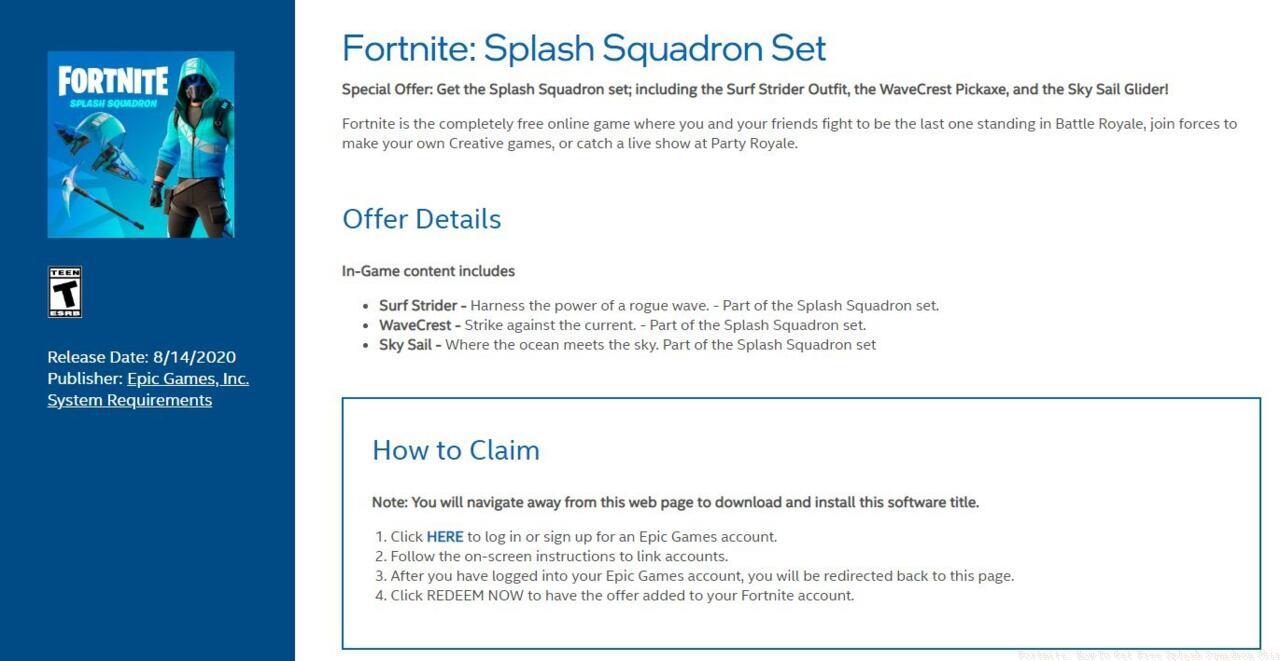
When accessing the set through Play Pass, you’ll encounter an interface resembling the displayed example. Select the provided hyperlink and adhere to the step-by-step directions to link your Intel Play Pass account with your Epic Games profile, then choose “Redeem Now” on the subsequent webpage to integrate the Splash Squadron collection into your inventory.
After successfully logging into Fortnite, the complete cosmetic ensemble should be accessible within their corresponding locker sections. Allow up to 24 hours for synchronization in rare cases, though typically items appear immediately.
Many participants encounter minor obstacles during the redemption workflow. Common issues include delayed item appearance, which usually resolves within one business day, or authentication problems that can be fixed by re-linking accounts. For optimal efficiency, schedule your gaming sessions around daily reset times to maximize challenge completion.
If you’re seeking additional gaming content strategies, our Complete Guide offers comprehensive assistance for other popular titles. The program’s flexibility allows you to play any combination of supported games—you don’t need to focus exclusively on Fortnite to earn the necessary experience points.
Remember that persistence pays dividends; while reaching level 16 requires dedication, the reward provides permanent cosmetic enhancement to your Fortnite experience. The Splash Squadron set represents one of the most valuable free offerings available through legitimate gaming reward platforms currently.
Action Checklist
- Download and install Intel Gaming Access app on your PC
- Create Intel account and keep app running during gameplay
- Complete daily Play Pass challenges for 2-3 weeks
- Reach level 16 and connect Intel account to Epic Games
- Redeem Splash Squadron set and verify in Fortnite locker
No reproduction without permission:SeeYouSoon Game Club » Fortnite: How To Get Free Splash Squadron Skin Complete guide to unlock the free Splash Squadron Fortnite skin through Intel Gaming Access program