
TL;DR
- Transmog allows permanent cosmetic customization of gear appearances through salvaging
- Access the Wardrobe system in Kyovashad and other major hub cities across Sanctuary
- Unlock new appearances by salvaging gear marked with ‘unlocks new look on salvage’
- Use dyes and ensemble slots to create coordinated cosmetic loadouts
- Manage transmog activation through your inventory panel after customization
Diablo 4’s transmogrification system provides comprehensive cosmetic customization, allowing you to alter your equipment’s visual presentation while maintaining its statistical benefits. This feature addresses the common dilemma where powerful gear may not align with your aesthetic preferences.
Throughout your journey across Sanctuary, you’ll accumulate numerous equipment pieces with varying appearances. While some items offer substantial character enhancements, others serve primarily as sources for new cosmetic options. The transmog system ensures you never have to sacrifice visual coherence for statistical advantages.
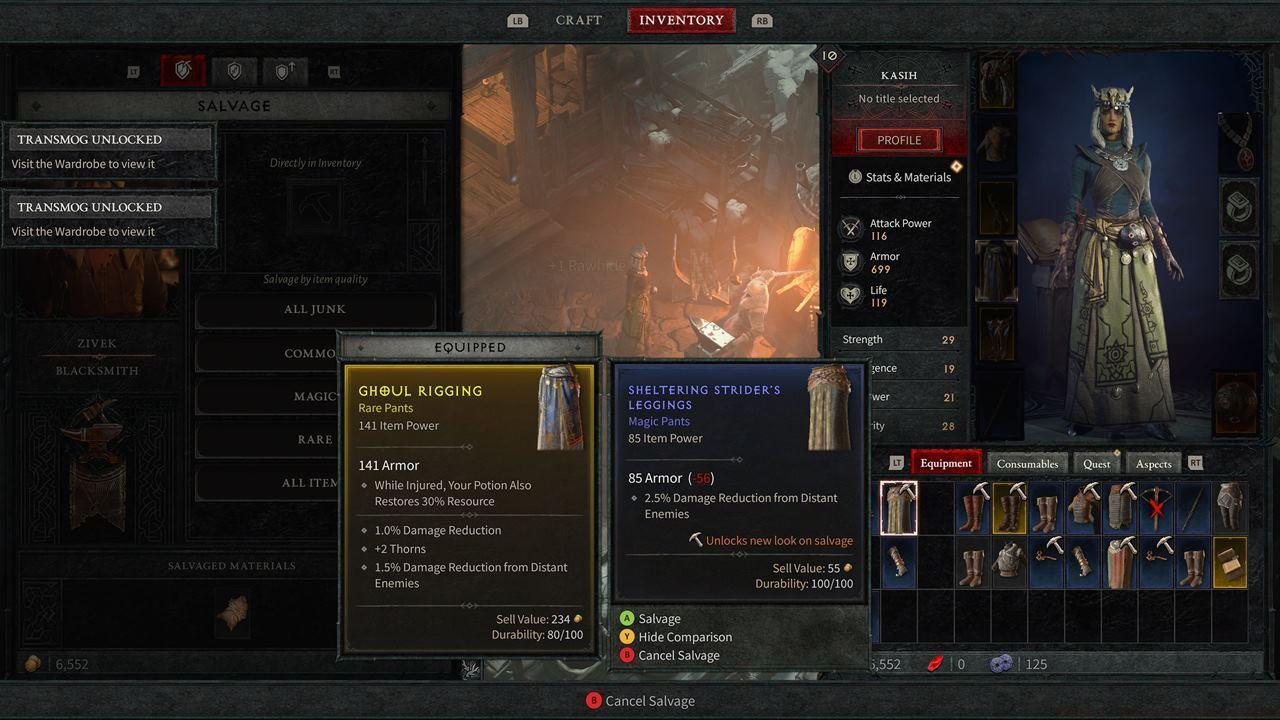
Strategic salvaging of unwanted equipment unlocks permanent appearance options for future customization.
The primary gateway to Diablo 4’s transmog functionality is the Wardrobe, conveniently situated within Kyovashad’s inn. This location becomes accessible during the early campaign stages, serving as your introduction to cosmetic customization systems.
Kyovashad functions as the central hub for Fractured Peaks region, though additional Wardrobe access points become available as you progress through subsequent acts. Major settlements throughout Sanctuary typically feature this essential service, ensuring consistent access regardless of your current location. For comprehensive guidance on navigating game systems, consult our Complete Guide to master similar mechanics across different gaming environments.
Weapon and armor visual designs remain locked initially, requiring specific actions to add them to your collection. The blacksmith serves as the key facilitator for this process, transforming physical gear into permanent cosmetic options.
When inspecting potential salvage candidates, watch for the distinctive ‘unlocks new look on salvage’ indicator accompanied by a pickaxe symbol. This designation confirms that dismantling the item will permanently preserve its aesthetic for future transmogrification use. Strategic salvaging decisions significantly expand your customization possibilities.
The Appearance interface resembles character creation screens where you initially customized facial features and markings. The Wardrobe tab specifically handles equipment cosmetic adjustments, offering these core functions:
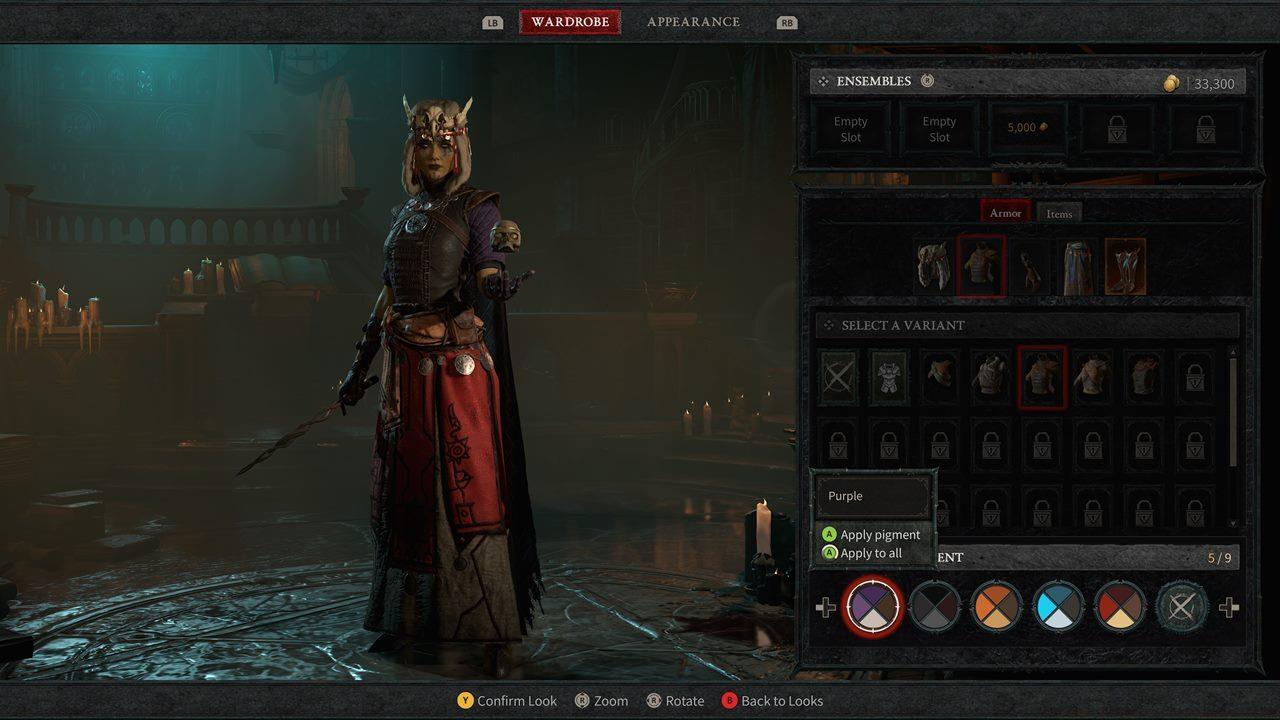
Advanced customization includes dye application and ensemble management for coordinated appearance loadouts.
Beyond basic appearance modification, Diablo 4’s transmog system incorporates sophisticated customization tools. The dye subsystem allows granular color control, enabling precise aesthetic coordination across your entire equipment set.
Ensemble functionality represents the system’s pinnacle, permitting saved cosmetic combinations for situational or thematic changes. This feature proves particularly valuable for players who maintain multiple visual identities or who wish to quickly adapt their appearance for different activities. Understanding these systems parallels the strategic approach needed for Weapons Unlock progression in other gaming contexts.
Common mistakes include overlooking salvage opportunities on common gear and failing to organize ensemble slots effectively. Optimize your approach by designating specific loadouts for different gameplay scenarios, much like the specialized preparations detailed in our Class Guide for optimal performance.
Action Checklist
- Identify gear with ‘unlocks new look on salvage’ indicator before dismantling
- Visit blacksmith in any major city to salvage marked items for permanent appearance unlocks
- Access Wardrobe system in Kyovashad or other hub cities
- Create and save at least three ensemble loadouts for different gameplay scenarios
- Apply coordinated dye schemes to unify your character’s visual presentation
No reproduction without permission:SeeYouSoon Game Club » Diablo 4 – How To Use Transmog And Dyes Master Diablo 4's transmog system to customize your character's appearance with salvaged gear and dyes