
Master Pokemon Unite’s advanced settings for competitive edge with optimized controls, FPS settings, and platform-specific configurations
Essential Settings for Competitive Advantage
Optimizing your Pokemon Unite configuration can dramatically transform your gameplay experience from casual to competitive. The right settings provide tangible advantages in reaction time, targeting accuracy, and overall battle awareness.
Pokemon Unite offers extensive customization options that significantly influence match outcomes. Mastering these settings separates novice trainers from elite competitors, providing crucial edges in targeting, movement, and situational awareness during intense team fights.
New players often struggle with the game’s streamlined default configuration, which prioritizes accessibility over competitive performance. These basic settings work adequately for learning mechanics but severely limit advanced gameplay potential. Competitive trainers should overhaul their configuration immediately after understanding fundamental controls.
Advanced controller options provide precision targeting, improved movement control, and enhanced combat efficiency that can decisively impact match results.
Platform-Specific Configuration Guide
Accessing settings varies significantly between Nintendo Switch and mobile versions, requiring platform-specific navigation approaches for optimal configuration.
Nintendo Switch Configuration
- Step 1: From the main menu, press the “X” button to access the navigation sidebar
- Step 2: Navigate to the bottom section and select the “Settings” option to enter configuration menus
Mobile Device Setup
- Step 1: On the home screen, tap the profile icon positioned in the upper-left corner
- Step 2: Scroll downward through the menu options until you locate the Settings section
Mobile players should note that touchscreen controls offer different customization opportunities compared to physical controllers. The interface adapts to touch input, providing unique configuration options for gesture controls and touch sensitivity that aren’t available on Switch.
Frame Rate Optimization Strategies
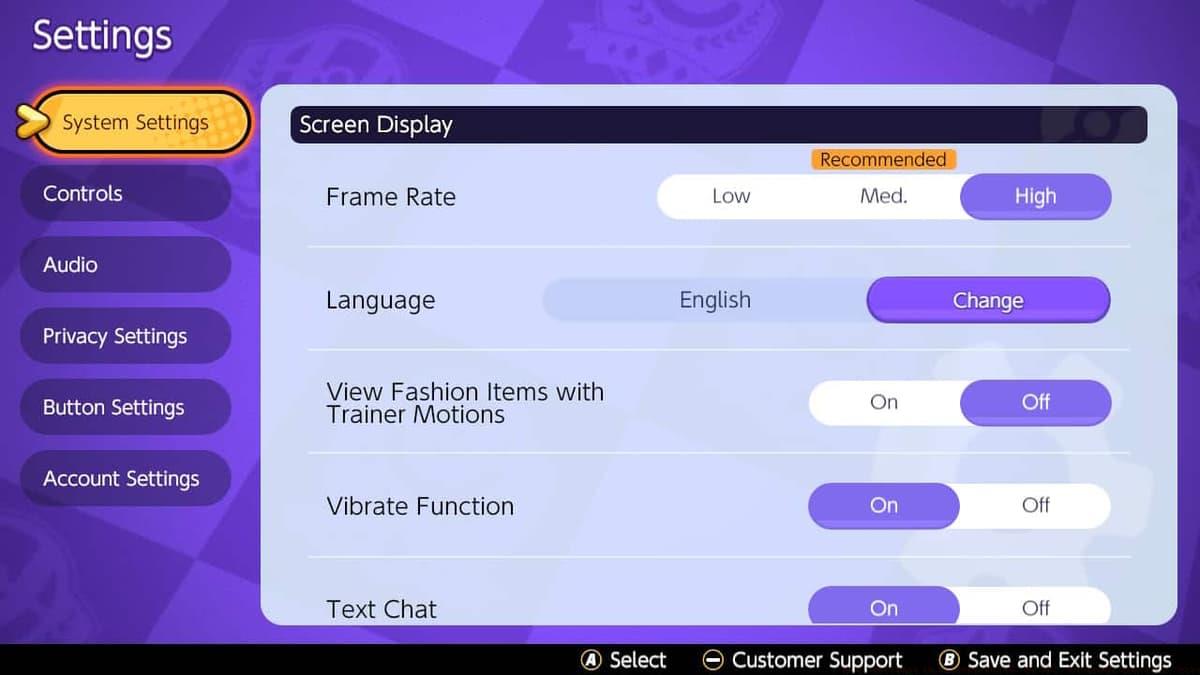
Upon reaching the settings interface, immediately locate the “Frame Rate” option in the initial configuration tab. Switch users playing in handheld mode should change this setting from “Medium” to “High” for optimal performance.
Activating high frame rate mode enables the portable version to operate at 60 FPS, matching the default docked performance. The docked configuration automatically uses higher frame rates, making manual adjustment unnecessary when connected to a television. Be aware that network stability can impact frame consistency, potentially causing occasional drops during matches with connection issues. Players preferring consistent performance over maximum frames can revert to medium settings for locked 30 FPS operation.
 The Pokemon Company / TiMi Studios
Handheld mode benefits significantly from frame rate optimization.
- Mobile devices also support high frame rate configuration, though performance depends heavily on device capabilities and network conditions. Wi-Fi connections typically provide smoother performance compared to mobile data, making frame rate consistency variable during travel or commuting situations.
- Graphics Quality options include Low, Medium, High, and Maximum presets. The game automatically suggests appropriate settings based on your device’s capabilities. If your hardware supports it, select the Maximum option for visually stunning battle effects and clearer ability animations that can improve timing and reaction.
Advanced Control Configuration Mastery
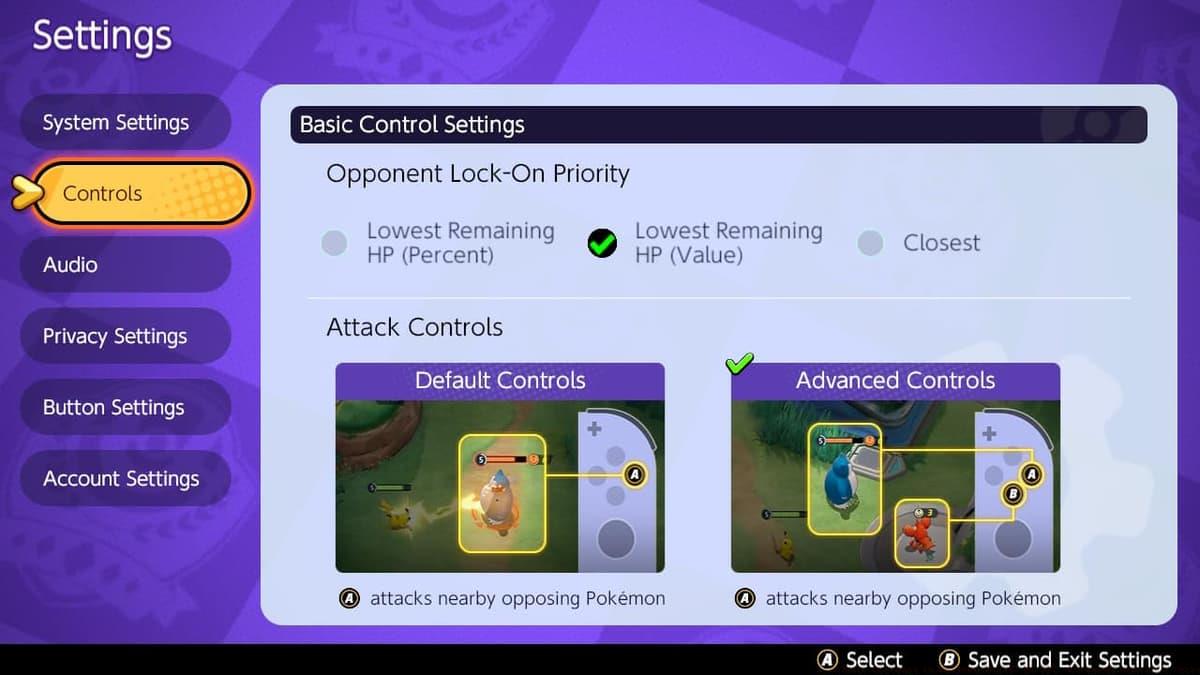
Control customization delivers the most substantial gameplay improvements. Enabling Advanced Controls provides dedicated buttons for distinguishing between wild Pokemon and opponent trainers, preventing accidental targeting of neutral creatures during player combat.
The targeting reticle system allows precise selection of specific opponents, crucial for eliminating priority targets in team fights. This precision targeting becomes increasingly important in higher rank matches where target selection determines fight outcomes.
Optimal Control Configuration
- Opponent Lock-On Priority: Lowest Remaining HP (Value) – Focuses fragile targets for elimination
- Attack Configuration: Advanced Controls – Enables precision targeting
- Automatic Basic Attacks: Disabled – Full manual control for ability combos
- Boosted Attack Indicator: Enabled – Visual cue for empowered attacks
- Movement Pursuit Range: Standard – Balanced engagement distance
- Movement Pursuit Mode: Disabled – Prevents unwanted positioning changes
- Goal Scoring Method: Button Press – Manual scoring control
- Camera Tracking: Enabled – Maintains battlefield awareness
- Ability Aim Direction: Follows Movement – Intuitive aiming alignment
- Ability Target Snapping: Disabled – Prevents accidental target switching
- Aiming Assistance: Assistance Disabled – Full manual aim control
 The Pokemon Company / TiMi Studios
Advanced Controls should be prioritized immediately for competitive play. Developer TiMi Studios provides extensive customization options, allowing players to experiment with different configurations to identify their personal optimal setup based on playstyle and preferred Pokemon roles.
Pro-Level Optimization Tips
While default configurations work adequately for beginners, competitive trainers should progressively customize settings as they gain experience. Common mistakes include leaving automatic attacks enabled, which disrupts ability combinations, and using aim assist that interferes with precision skill shots.
Advanced players should periodically review and adjust configurations based on meta changes, new Pokemon additions, and personal skill development. Different roles (attacker, defender, supporter) may benefit from specialized configurations optimizing their specific responsibilities.
Best Ultra League team in Pokemon Go season 25
Best Fortnite aim settings for PC, console & mobile
Pokemon Unite codes (December 2025)
For comprehensive guidance on mastering Pokemon Unite, explore our detailed character guides and strategic resources: Absol | Alolan Ninetails | Blastoise | Blissey | Charizard | Cinderace | Cramorant | Crustle | Eldegoss | Garchomp | Gardevoir | Gengar | Greninja | Lucario | Machamp | Mr Mime | Pikachu | Slowbro | Snorlax | Talonflame | Wigglytuff | Venusaur | Zeraora | All Held Items | All Battle Items | Best settings | Badge & medals explained
No reproduction without permission:SeeYouSoon Game Club » Best settings in Pokemon Unite: 60 FPS, advanced controls, more Master Pokemon Unite's advanced settings for competitive edge with optimized controls, FPS settings, and platform-specific configurations